Savings Plans
The Savings Plan Designer empowers you to make informed, data-driven decisions and conduct what-if analyses to determine the optimal strategy for implementing savings plans. The Designer includes several key components: Visualizations, Slicers, and Resource-level Details.
Visualizations
The graph illustrates the cyclical nature of resources that qualify for a Savings Plan. It displays the spending solely for eligible compute resources. For instance, it includes the cost of a Virtual Machine compute SKU, but excludes disks and other related costs that are not covered by the Savings Plan.
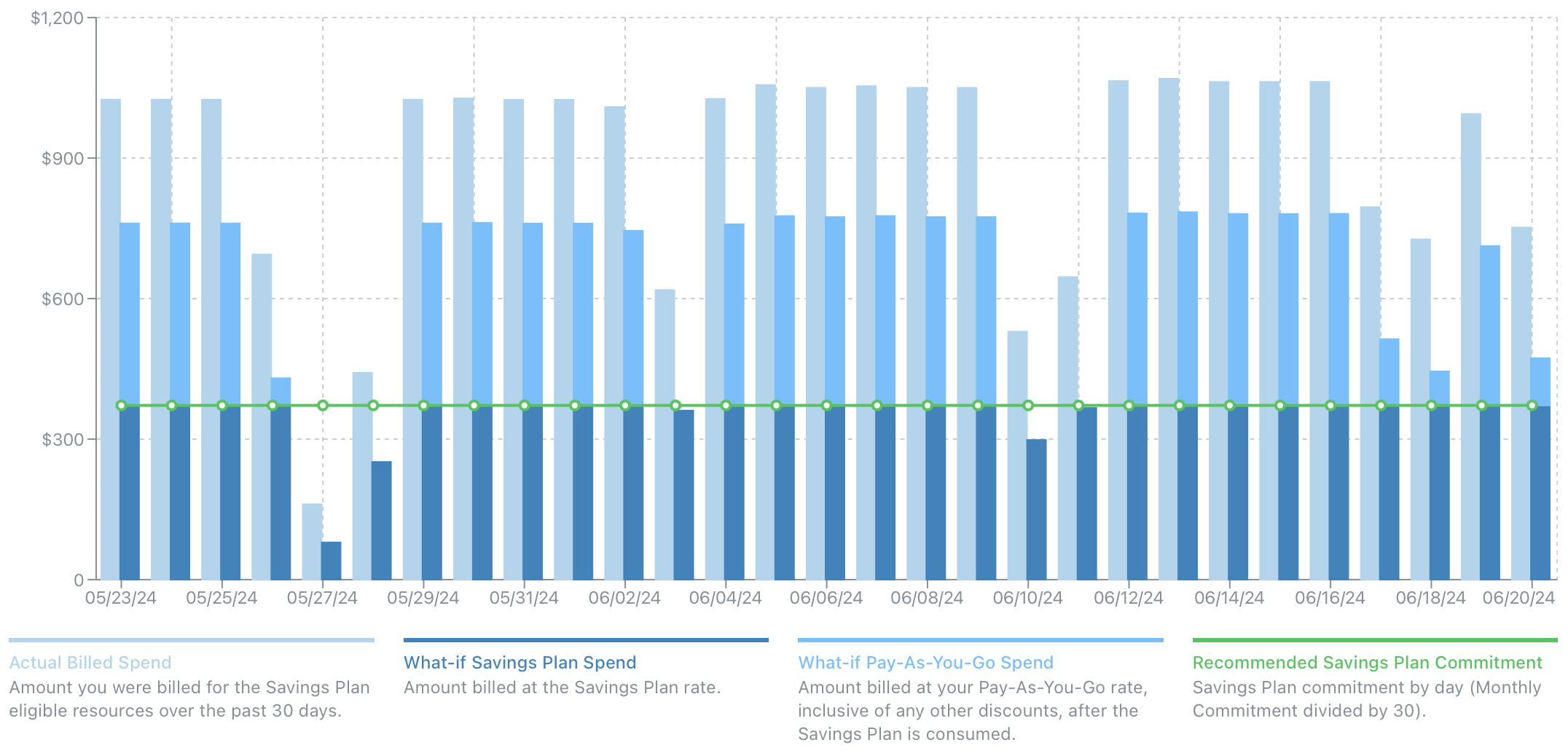
| Category | Description |
|---|---|
| Actual Billed Spend | The amount billed for Savings Plan-eligible compute resources over the past 30 days, inclusive of any discounts. This includes resources that are eligible but do not currently have a Savings Plan or Reserved Instance. This amount helps calculate your future Savings Plan commitment and includes a look-back to visualize how a Savings Plan would have been utilized. |
| What-if Savings Plan Spend | The amount you would have spent at the Savings Plan rate if it were implemented. |
| What-if Pay-As-You-Go Spend | The excess amount you would have spent at the Pay-As-You-Go rate after fully utilizing the Savings Plan. |
| Recommended Savings Plan Commitment | The recommended Savings Plan commitment based on the slicers. This aligns with the What-if Savings Plan Spend and provides an additional visual aid to help you understand the Savings Plan commitment you should consider purchasing. |
Designer
The Designer allows you to create what-if scenarios by adjusting the Savings Plan term, overall commitment percentage, and identifying resources that are not currently eligible but could be if the underlying SKU were changed.
In this example, the Savings Plan recommendations include ineligible App Service Plans. Although App Service Plans can support Savings Plans, only the Premium V3 SKU is eligible. CloudDIET identifies ineligible App Service Plans and determines if they can be upgraded with minimal risk.
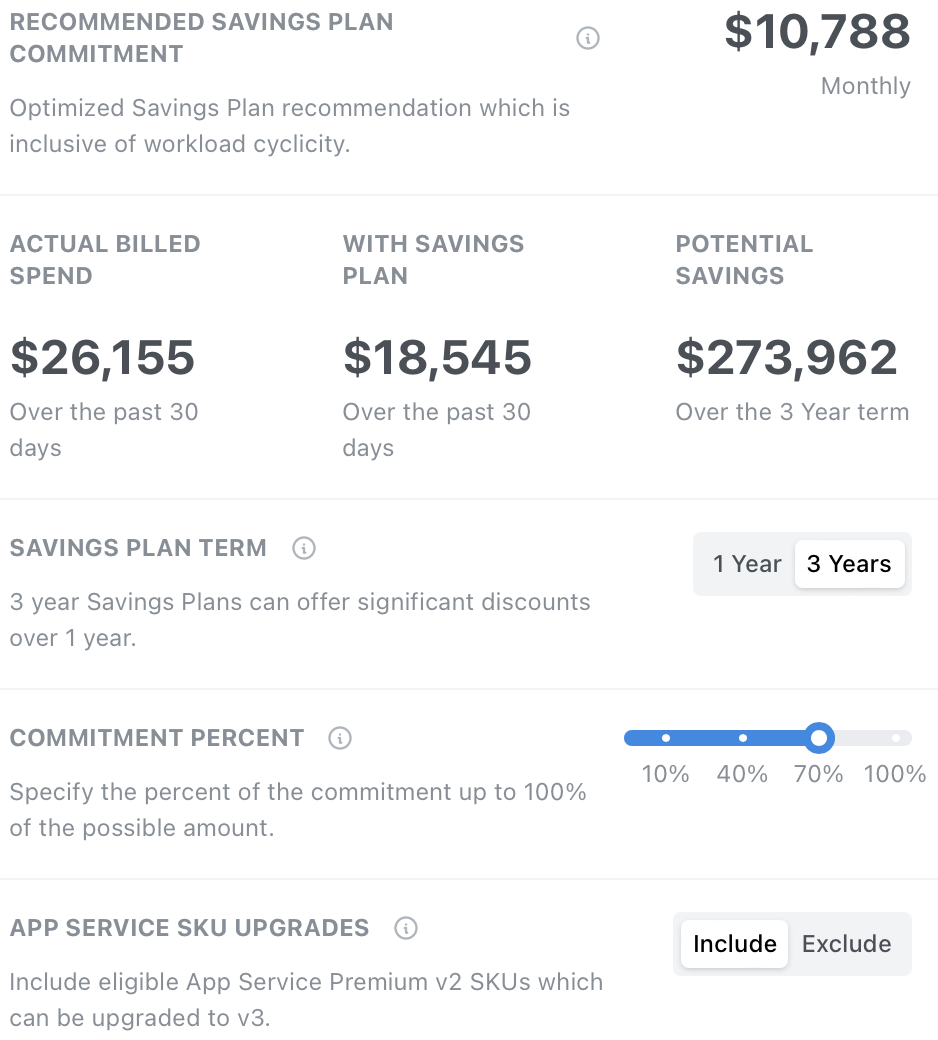
CloudDIET sets the Commitment Percent to a conservative default of 70%. For instance, if your maximum Savings Plan commitment based on current spending is $100, the Designer will recommend a $70 commitment. The Commitment Percent feature lets you adjust the level of commitment based on your business needs and anticipated changes in resource usage. This helps ensure you do not overcommit.
Frequently Asked Questions
Why choose Savings Plans over Reserved Instances?
While Reserved Instances can offer a higher discount, Savings Plans can provide much more flexibility and can often provide more savings. Reserved Instances are purchased based on the SKU and region. For example, a Reservation for a Dv2 Virtual Machine series in West US is only applicable to those resources. If the Virtual Machine series or region changes, the Reserved Instance is no longer applicable and results in a wasted cost.
With Savings Plans, you do not specify SKUs, series, or regions. The amount of Savings Plan you purchase is automatically applicable to all and any eligible resources, and starts with those that benefit from the highest discount.
Can I commit to multiple Savings Plans?
Yes, and this is an important and valuable capability. You can have one or many Savings Plans commitments created at different times. This allows you to benefit from Savings Plans sooner by starting at a lesser amount and incrementally increasing your overall Savings Plan over time.
Which Azure services are eligible for a Savings Plan?
The below Azure services are eligible for a Savings Plan with the exception of a few underlying SKUs.
- Virtual Machines
- App Service Premium v3
- App Service Isolated v2
- Functions Premium
- Container Instances
- Container Apps
- Dedicated Host
- Spring Apps Enterprise